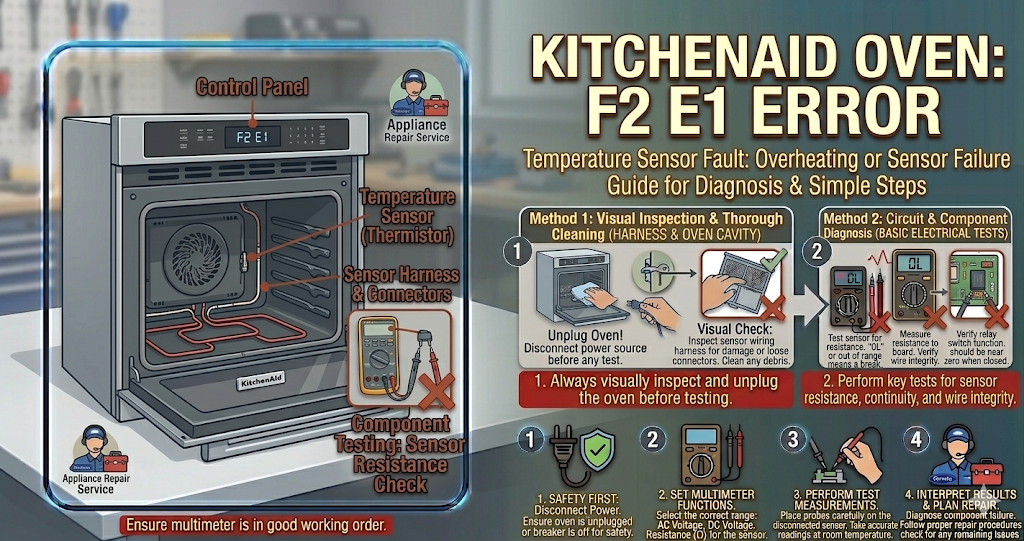
Seeing the kitchenaid oven f2 e1 error pop up on your digital display right when you are about to bake dinner is a highly frustrating experience. Instead of preheating smoothly, your appliance starts beeping uncontrollably and locks you out of all baking functions. This specific fault code indicates a critical problem with the electronic user interface or the membrane key switch. In simple terms, the internal computer believes that a button is permanently stuck, pressed down, or short-circuited.
To protect the appliance from running dangerous, unintended heating cycles, the control board halts all operations and displays the kitchenaid oven f2 e1 error until the issue is properly resolved. Fortunately, repairing this specific issue is often a manageable DIY project. You can usually resolve the kitchenaid oven f2 e1 error without paying for an expensive professional service call, using just a few basic hand tools.
⚠️ SAFETY FIRST: Always unplug your oven from the wall outlet or flip the dedicated dual circuit breaker in your main electrical panel before attempting to remove panels or inspect internal wiring to prevent severe electric shock.
What Causes the KitchenAid Oven F2 E1 Error?
When your screen continuously flashes the kitchenaid oven f2 e1 error, you are dealing with a direct communication failure between the touch panel and the main electronic board. The most common triggers for this failure include:
- Moisture in the Panel: Cleaning the glass display with heavy liquid sprays can cause water or glass cleaner to seep behind the protective layer, shorting out the delicate internal components.
- Stuck Keypad Button: Over time, cooking grease and tiny food particles can cause one of the membrane switches to physically stick in the depressed position.
- Loose Ribbon Cable: The thin, flat ribbon cable connecting the user interface to the main electronic control board can become loose or slightly disconnected from normal door vibrations.
- Failed Control Board: If the internal electrical relays on the main board fail, it might misinterpret normal signals from the keypad, triggering the kitchenaid oven f2 e1 error by mistake.
How to Fix the Issue Step-by-Step
You can safely diagnose the exact cause and permanently clear the kitchenaid oven f2 e1 error by following these straightforward DIY troubleshooting steps:
- Perform a Hard Reset: Sometimes, a simple software glitch causes the constant beeping. Turn off the circuit breaker to the oven for a full 5 to 10 minutes. Turn it back on. If the beep stops and the clock returns, the system has successfully rebooted.
- Clean the Touchpad: Use a lightly damp microfiber cloth (never spray cleaner directly on the unit) to gently clean the entire glass interface. Ensure no buttons feel sticky, rigid, or deeply depressed.
- Inspect the Ribbon Cable: If the beeping continues, pull the oven out and remove the back upper access panel. Locate the flat ribbon cable connecting the display to the main board. Carefully unclip it, clean the metal contacts gently with a dry pencil eraser, and re-seat it firmly into its socket.
- Replace the Membrane Switch: If cleaning and resetting the cable does not work, the membrane switch itself is permanently shorted. Replacing this specific user interface part is the most common and effective permanent fix.
Preventative Maintenance Tips
The absolute best way to prevent the kitchenaid oven f2 e1 error from returning in the future is to change how you clean your kitchen appliance.
Never spray liquid glass cleaner or heavy chemical degreasers directly onto the electronic control panel. Always spray your microfiber cloth first, then wipe the surface gently to avoid moisture penetration.
When to call a professional?
If you have performed a hard reset, cleaned the internal ribbon cable, and even replaced the user interface membrane, but the kitchenaid oven f2 e1 error continues to lock the appliance, your main control board is likely heavily damaged. Because replacing and programming a main control board involves complex wire harnesses and high-voltage testing, it is highly recommended to contact a certified local appliance technician to safely complete the repair.