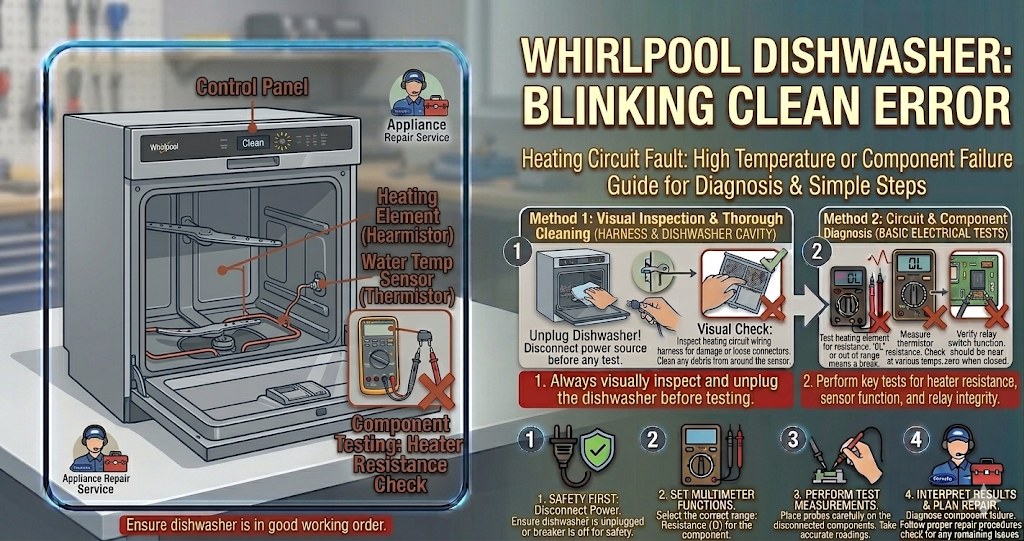
Encountering a whirlpool dishwasher blinking clean light when you try to start a new wash cycle is incredibly stressful. Your appliance refuses to run, the buttons seem unresponsive, and you are left with a sink full of dirty dishes.
This specific flashing sequence (usually seven consecutive flashes) is a built-in safety lockout. The internal computer detects that the water inside the tub did not reach the proper temperature during the previous wash cycle. To protect you from eating off improperly sanitized plates, the system shuts down completely. Fortunately, resolving a whirlpool dishwasher blinking clean light is often a quick DIY task that requires resetting the computer or replacing a very inexpensive heating part.
⚠️ SAFETY FIRST: Always turn off the dedicated circuit breaker supplying power to your dishwasher before attempting to remove the lower kickplate or inspect internal electrical wiring to prevent severe electric shock.
What Causes the Issue?
When you are trying to diagnose a whirlpool dishwasher blinking clean light, you must focus on the heating system. The most common reasons the water fails to heat up include:
- A Glitch in the Control Board: Sometimes, a temporary power surge or a software glitch causes the computer to mistakenly think the water is cold, triggering the whirlpool dishwasher blinking clean light error.
- Faulty Heating Element: The thick, black metal tube at the bottom of the tub is the heating element. Over time, it can crack or burn out, preventing it from heating the water during the wash and dry cycles.
- Failed High-Limit Thermostat: This small safety sensor sits under the tub. If it malfunctions and stays “open,” it cuts power to the heater entirely.
- Broken Wires: The intense heat and humidity under the appliance can eventually cause the wire harness connecting the heater to become brittle and snap.
How to Fix It Step-by-Step
You can safely test the components, reset the computer, and permanently clear the whirlpool dishwasher blinking clean light by following these actionable troubleshooting steps:
- Perform the Reset Sequence: Before taking anything apart, try the secret reset code. Press three consecutive buttons on your control panel (for example: Heated Dry, Normal, Heavy) and repeat that sequence three times in a row (1-2-3, 1-2-3, 1-2-3). Close the door. The machine will run a short diagnostic cycle and reset the error.
- Inspect the Heating Element: Open the door and visually inspect the black heating ring at the bottom. If you see visible blisters, cracks, or broken sections, the element is destroyed and must be replaced.
- Test for Continuity: If the reset code works but the error returns after one wash, you need to test the parts. Turn off the power, remove the bottom kickplate, and disconnect the wires to the heating element. Use a multimeter to test the metal terminals for continuity.
- Check the Thermostat: While you are under the tub, locate the small round thermostat pressed against the bottom of the machine. Test it with your multimeter. If it lacks continuity at room temperature, it is defective.
Preventative Maintenance
The best way to prevent a whirlpool dishwasher blinking clean light from returning is to run the hot water at your kitchen sink for 30 seconds before starting the dishwasher. This ensures the tub fills with piping hot water right from the start, taking the strain off the appliance’s heating element.
When to call a professional?
If you have performed the keypad reset, replaced the heating element, and verified the thermostat has continuity, but the whirlpool dishwasher blinking clean light immediately starts flashing again, you are likely dealing with a burned-out main electronic control board. Because diagnosing and replacing a main board requires working with complex wire harnesses, it is highly recommended to contact a certified local appliance technician to safely complete the repair.