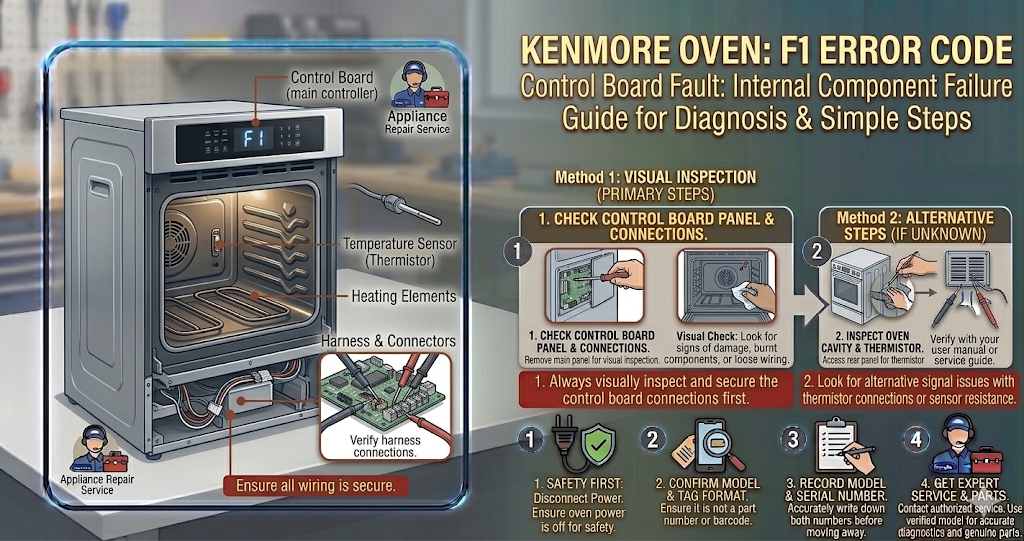
There’s nothing quite as frustrating as an oven that won’t stop beeping. If your range is flashing the Kenmore oven F1 error code and sounding a continuous alarm, you are likely dealing with an issue in the brain of your appliance: the electronic control board.
While a beeping oven can be annoying (and a bit alarming), the F1 code is one of the most common Kenmore malfunctions. In this guide, we will explain exactly what this error means, the most likely culprits, and how you can troubleshoot and fix it yourself.
What Does the Kenmore Oven F1 Error Code Mean?
In almost all Kenmore range and oven models, the Kenmore oven F1 error code indicates a failure in the Electronic Range Control (ERC) or the Electronic Oven Control (EOC). It essentially means that the main control board is sensing a critical internal fault or a stuck key on the front touchpad.
When the system detects this malfunction, it triggers the F1 error and a loud, continuous beep to prevent the oven from turning on accidentally and causing a safety hazard.
Common Causes for the F1 Error:
- A glitch in the control board: Sometimes, a simple power surge can scramble the board’s memory.
- A faulty Membrane Switch (Touchpad): If moisture, heat, or grease gets behind the control panel, it can cause the buttons to short out or register as “stuck.”
- A failed Electronic Oven Control (EOC) board: Over time, the relays and components on the main circuit board can burn out and require a complete replacement.
How to Fix the Kenmore Oven F1 Error Code (Step-by-Step)
Before replacing any parts, follow these troubleshooting steps to isolate the exact cause of the error.
Safety First: Always disconnect the power to your oven before performing any inspections or repairs. Unplug the unit from the wall or turn off the dedicated circuit breaker.
Step 1: The Hard Power Reset
Before tearing the oven apart, try clearing the error with a hard reset. Power surges or brief outages can cause the EOC to freeze and display a false Kenmore oven F1 error code.
- Turn off the power: Unplug the oven or flip the circuit breaker off.
- Wait 5 to 10 minutes: This gives the capacitors on the control board enough time to discharge completely.
- Restore power: Turn the breaker back on.
If the code disappears and the oven works normally, it was just a temporary glitch. If the beeping and the error return immediately, proceed to Step 2.
Step 2: Check the Touchpad vs. The Control Board
The F1 error usually narrows down to two parts: the touchpad (membrane) or the main EOC board. Here is the standard technician trick to figure out which one is broken:
- Disconnect the power to the oven.
- Remove the back panel of the console to access the main control board.
- Locate the ribbon cable that connects the front touchpad to the EOC board.
- Carefully disconnect the ribbon cable from the board.
- Make sure the loose cable isn’t touching anything, and turn the power back on.
How to read the results:
- If the Kenmore oven F1 error code comes back after a minute: The problem is the Electronic Oven Control (EOC) board. The board is failing internally and must be replaced.
- If the F1 code DOES NOT come back: The problem is the Touchpad/Membrane Switch. Because the board works fine when the touchpad is unplugged, it means a stuck key on the membrane was causing the short. You will need to replace the touchpad.
Step 3: Replace the Faulty Component
Depending on the results from Step 2, you will need to order a replacement part.
Replacing the EOC board or the touchpad is usually a straightforward plug-and-play process. You simply unscrew the old component, transfer the wire harnesses one by one to the new board (taking a picture beforehand is highly recommended!), and screw the new part into place.
Note: Make sure to look up your exact Kenmore model number (you can usually find your manual on the official Kenmore support page) to ensure you order the correct replacement board or membrane.
When to Call a Professional
Working with appliance electronics can be intimidating. If you are not comfortable dealing with wire harnesses or opening the back panel of your oven, it is always best to contact a certified appliance repair technician. However, diagnosing the Kenmore oven F1 error code yourself beforehand can save you time and help you understand the repair quote.
Related Reading: Is your kitchen giving you more trouble? Check out our guide on how to fix the [Samsung Oven SE Error].