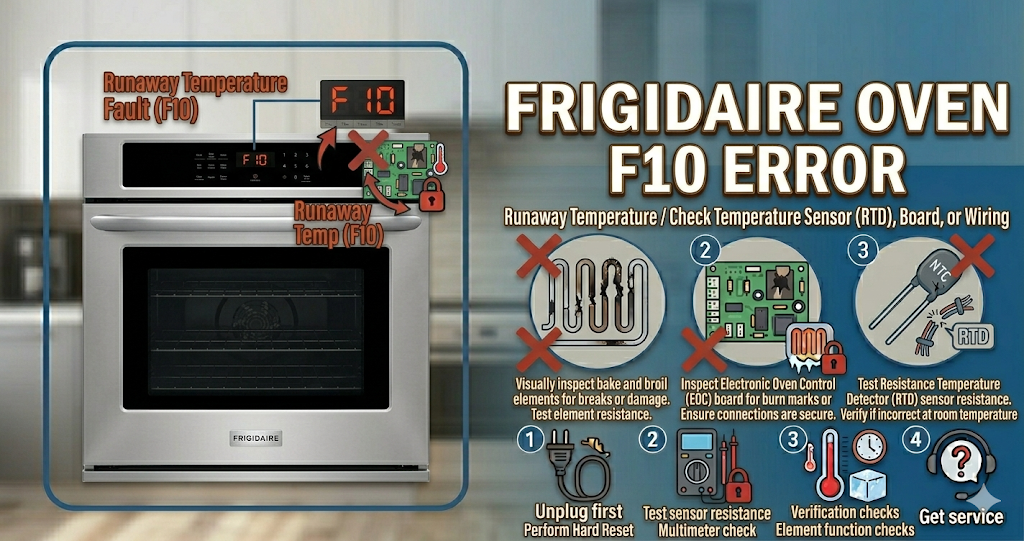
The Frigidaire oven F10 error code is a critical safety alert that indicates a “runaway temperature” condition. This means the oven’s electronic control board (ERC) thinks the temperature inside the oven cavity is rising uncontrollably, often exceeding 600°F during a normal bake cycle. When the Frigidaire oven F10 error appears, it is usually accompanied by a loud, persistent beeping sound to warn you of a potential fire hazard. Fortunately, this is often caused by a faulty sensor rather than an actual fire, and you can fix it yourself with basic tools.
⚠️ SAFETY FIRST: Because the Frigidaire oven F10 error involves a risk of extreme overheating, you must immediately turn off the dedicated double-pole circuit breaker in your home’s electrical panel or unplug the range from the wall. Do not attempt to use the oven until the cause of the overheating has been diagnosed and repaired.
What Causes the Frigidaire Oven F10 Error Code?
When your digital display flashes the Frigidaire oven F10 error, the control board has lost its ability to accurately monitor or regulate the heat. The most common triggers for this runaway temperature alarm include:
- Faulty Oven Temperature Sensor (RTD): This is the culprit in the vast majority of cases. The long metal probe in the back of the oven fails internally, sending a “shorted” signal to the board that looks like extreme heat.
- Stuck Control Board Relay: Sometimes, the mechanical relay on the electronic control board that sends power to the heating element gets “welded” shut. This causes the element to stay on 100% of the time, even when the oven should be cycling off.
- Damaged Wiring Harness: If the wires connecting the temperature sensor to the main board are pinched, melted, or frayed, they can create a short circuit that triggers the Frigidaire oven F10 error.
- Main Control Board (ERC) Failure: If the sensor and wiring are perfect, the internal microchip on the control board itself has likely failed and can no longer process temperature data correctly.
Tools You Will Need for This Repair
To properly diagnose and resolve the Frigidaire oven F10 error, gather these basic tools:
- A Phillips-head screwdriver or a 1/4-inch nut driver.
- A digital multimeter (essential for testing the sensor’s resistance).
- Heat-resistant gloves (if the oven is still hot).
- A flashlight.
How to Fix Frigidaire Oven F10 Error Step-by-Step
You can often stop the beeping and clear the Frigidaire oven F10 error in less than 20 minutes by following these DIY troubleshooting steps:
- Perform a Hard Power Reset: Sometimes a temporary power surge confuses the board. Turn off the circuit breaker for 10 full minutes. Turn it back on. If the F10 code returns immediately, proceed to the next step.
- Inspect the Temperature Sensor: Open the oven door. The sensor is the thin metal rod protruding from the back wall near the top. Ensure it isn’t touching the side wall or a rack, and that it isn’t visibly bent or burnt.
- Test the Sensor with a Multimeter: To do this correctly, you must unplug the sensor from the wiring harness. You can usually do this by removing the two screws holding the sensor to the back wall and pulling it forward until the plastic connector clips through the hole.
- Check the Ohms: Set your multimeter to the Ohms (Ω) setting. At room temperature (approx. 70°F), a healthy Frigidaire sensor should read between 1,050 and 1,100 Ohms. If it reads 0, 1, or something drastically different like 2,000+ Ohms, the sensor is dead and is causing the Frigidaire oven F10 error.
- Check the Board Relays: If the sensor tests fine, plug the oven back in (carefully) and listen. If the heating element starts glowing red-hot the moment you restore power—without you even turning the oven on—the control board relay is stuck and the entire board must be replaced.
How to Reset a Frigidaire Oven (Clear the Beeping)
After installing a new temperature sensor or repairing the wiring, you must clear the Frigidaire oven F10 error from the memory. Restore power to the unit. Press the “Cancel” or “Off” button on the keypad to stop the alarm. Set the oven to “Bake” at 350°F and monitor it closely for 15 minutes. Use an independent oven thermometer to verify the internal temperature matches the display.
When to call a professional?
If you have replaced the temperature sensor and the Frigidaire oven F10 error persists, or if you suspect the main electronic control board is faulty, it is time to call a pro. Replacing a main control board involves handling delicate high-voltage circuits and complex wiring harnesses that require specialized training to install safely without damaging other components.