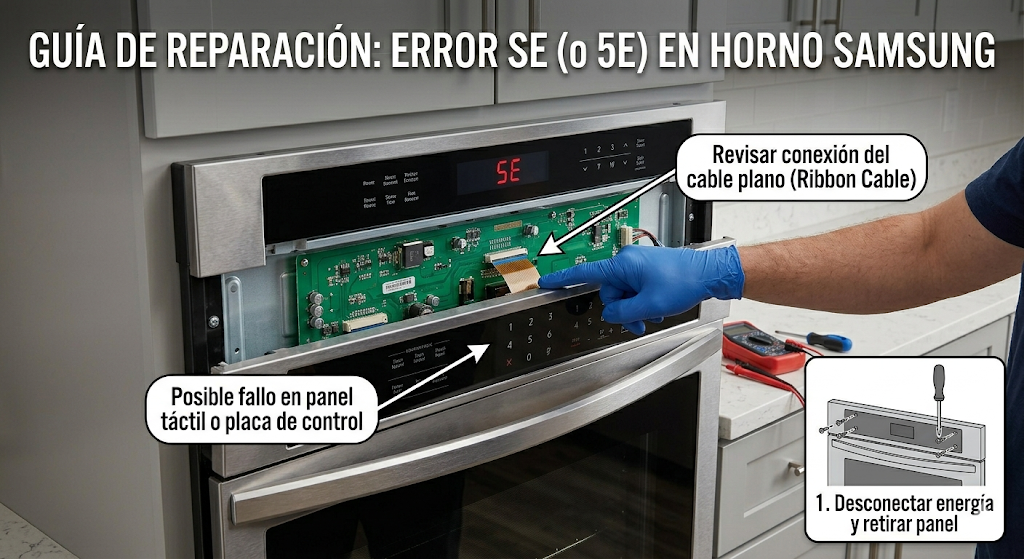
Dealing with the samsung oven se error right before you are about to cook dinner is incredibly frustrating, especially when the appliance starts beeping uncontrollably. First, it is important to clarify a very common point of confusion: because of how the digital display lights up, many homeowners read this code as a “5E” error. However, the official code is actually “SE”, which stands for “Sensor Error” or a “Short Key” error. This specific fault code means that the main control board detects a stuck button or a short circuit in the touch membrane panel. Fortunately, you can often resolve the samsung oven se error without spending hundreds of dollars on a brand-new control board.
⚠️ SAFETY FIRST: Always unplug your electric oven from the wall outlet or flip the dual circuit breakers in your home’s electrical panel to the “OFF” position before attempting any repairs to prevent severe electric shock.
What Causes the Samsung Oven SE Error?
When your digital display constantly flashes the samsung oven se error and beeps, the appliance is locking you out of the cooking functions for safety reasons. The most frequent causes of this touchpad malfunction include:
- A Glitch in the Control Board: Sometimes, a temporary power surge or a brief electrical fluctuation in your home can scramble the oven’s computer memory, making it think a button is permanently pressed down.
- Dirty or Wet Keypad: Moisture from boiling pots or heavy grease buildup on the front glass can seep into the touch membrane, creating a false electrical connection that triggers the code.
- Loose Ribbon Cable: The keypad connects to the computer brain (the control board) via a flat, delicate ribbon cable. If this cable becomes loose from normal vibrations or the contacts get oxidized, the signal drops.
- Failed Touch Membrane: If the oven is several years old, the internal plastic layers of the touchpad simply wear out from repeated pressing and heat exposure.
How to Fix the Samsung Oven SE Error Step-by-Step
You can often stop the beeping and clear the samsung oven se error permanently by following these actionable DIY troubleshooting steps:
- Perform a Hard Reset: The easiest and fastest way to clear a temporary samsung oven se error is to reboot the system. Do not just press the “Clear” button. Go to your breaker box and turn off the power to the oven entirely for at least 5 to 10 minutes. Turn it back on. If the code disappears and the buttons work, it was just a glitch.
- Clean the Touch Panel: Spray a microfiber cloth with a mild glass cleaner or a mixture of white vinegar and water. Thoroughly clean the entire glass touch panel to remove any invisible grease films or moisture droplets. Dry it completely with a clean towel.
- Reseat the Ribbon Cable: If the hard reset did not work, you will need a screwdriver. Unplug the oven, remove the upper back panel behind the control board, and locate the flat ribbon cable connecting the keypad to the green circuit board. Carefully unclip the harness, gently pull the cable out, and use a standard pencil eraser to gently rub the metal contacts to remove oxidation. Plug it back in securely.
- Test the Oven: Reassemble the back panel, restore the power, and press the “Bake” or “Broil” buttons to see if the panel responds normally.
How to Prevent Future Control Panel Issues
To keep the samsung oven se error from returning, always use the exhaust hood fan when boiling large pots of water on the stove beneath the microwave or oven control panel. Steam is the number one enemy of delicate electronic touch membranes.
When to call a professional?
If you have thoroughly cleaned the glass, hard-reset the appliance, and carefully reseated the ribbon cable, but the samsung oven se error immediately comes back, the touch membrane itself has permanently shorted out. At this stage, you will need to replace either the keypad or the entire electronic control assembly. Because sourcing the correct part number and installing a new main board can be technically challenging, it is highly recommended to contact a certified local appliance technician to complete the repair safely.